Streams in Node.js
Streams are a way to handle data chunk by chunk, instead of all at once.
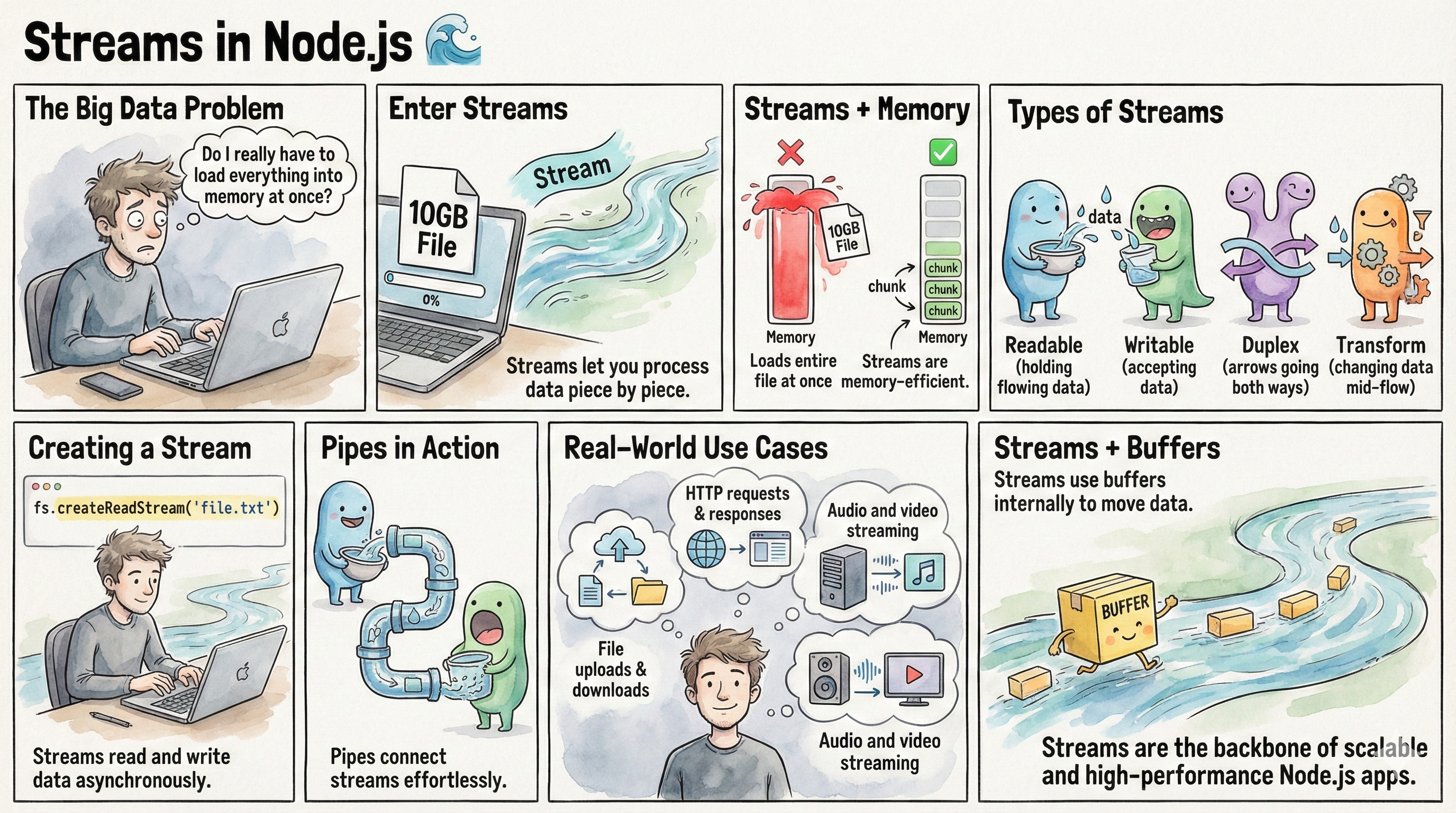
If Buffers answers the question:
“How is data stored in memory?”
Then Streams answer the much more important question:
“How does data move through a Node.js application?”
And this is where Node.js quietly becomes a monster in performance.
Most developers use streams.
Very few actually understand them.
By the end of this blog:
- Streams will feel obvious
- You’ll know why they exist
- You’ll understand backpressure (without pain)
- You’ll know why Node beats traditional servers at I/O
- And you’ll never read a large file the wrong way again
We’ll start from absolute zero.
STREAMS
1. The problem Streams were created to solve
Imagine you have a 5 GB video file on your server.
Now answer honestly:
What happens if you do this?
const data = fs.readFileSync("movie.mp4");
What Node.js does:
- Reads the entire 5 GB file
- Loads it fully into memory
- Then gives it to you
Congratulations 🎉
You’ve just:
- blocked the event loop
- eaten all RAM
- crashed your server
- and taken other requests down with you
This is not a Node.js bug.
This is how reading everything at once works.
So the real question is:
“Why read the whole file when the user will watch it piece by piece?”
That question gave birth to Streams.
2. What is a Stream? (Core idea)
A Stream is a way to handle data chunk by chunk, instead of all at once.
That’s the whole idea.
More formally:
A stream is an object that lets you read or write data sequentially, over time.
Think of it like this:
- Buffer = a container
- Stream = a pipeline
A buffer holds data.
A stream moves data.
3. Real-world analogy
Think about drinking water.
You don’t:
- store the entire river in your mouth
- then drink it
You:
- sip
- swallow
- sip again
That’s a stream.
Small chunks.
Continuous flow.
No overflow.
4. Streams are everywhere (you already use them)
You may not realize it, but Node streams are everywhere:
- HTTP requests
- HTTP responses
- File read/write
- Video streaming
- Audio streaming
- Zip/unzip
- Compression
- Encryption
Example:
req.on("data", chunk => {
  // chunk is a Buffer
});
That chunk?
A Buffer
Streams don’t replace buffers.
They use buffers.
5. The 4 types of Streams in Node.js
This is interview gold.
1. Readable
You read data from it
Examples:
fs.createReadStream- HTTP request (
req)
2. Writable
You write data to it
Examples:
fs.createWriteStream- HTTP response (
res)
3. Duplex
Read + write
Examples:
- TCP sockets
4. Transform
Modify data while streaming
Examples:
- gzip compression
- encryption
- changing text case
6. Readable Streams (step by step)
Let’s read a file the right way.
const fs = require("fs");
const stream = fs.createReadStream("bigfile.txt");
What Node does:
- Opens the file
- Reads a small chunk (default ~64KB)
- Emits it
- Repeats
Nothing explodes.
Memory stays calm.
Reading data from a stream
stream.on("data", chunk => {
  console.log(chunk); // Buffer
});
Each chunk:
- is a Buffer
- is a piece of the file
- arrives when ready
When finished:
stream.on("end", () => {
  console.log("Done reading file");
});
7. Writable Streams
Writable streams consume data.
Example:
const writeStream = fs.createWriteStream("output.txt");

writeStream.write("Hello ");
writeStream.write("World");
writeStream.end();
Data flows into the stream.
8. Pipe - the most important stream feature
This is where streams become magical.
readStream.pipe(writeStream);
What just happened?
- Data flows from readable -> writable
- Automatically
- Chunk by chunk
- With backpressure handled for you
You didn’t:
- manage memory
- loop chunks
- throttle speed
Node did it.
9. Backpressure
Backpressure means:
“The destination is slower than the source.”
Example:
- File reads fast
- Network writes slow
If Node didn’t handle this:
- memory would fill up
- buffers would pile up
- crash 💥
Streams solve this by:
- pausing reading when writing is slow
- resuming when ready
You get flow control for free.
This is one of Node’s biggest superpowers.
10. Transform Streams
Transform streams change data while it flows.
Example: uppercase transform
const { Transform } = require("stream");

const upperCase = new Transform({
  transform(chunk, encoding, callback) {
    callback(null, chunk.toString().toUpperCase());
  }
});
Now pipe it:
readStream
  .pipe(upperCase)
  .pipe(writeStream);
Data:
- enters lowercase
- exits uppercase
- without ever loading fully into memory
11. Streams + HTTP
This is why Node dominates APIs.
app.get("/video", (req, res) => {
  const stream = fs.createReadStream("video.mp4");
  stream.pipe(res);
});
What happens:
- Client starts receiving data immediately
- Server memory stays low
- No blocking
- No buffering entire file
This is true streaming.
12. Streams vs Buffers
| Concept | Buffer | Stream |
|---|---|---|
| Purpose | Store data | Move data |
| Size | Fixed | Continuous |
| Memory | Allocated upfront | Controlled |
| I/O friendly | No | Yes |
| Used together | — | Always |
Rule of thumb:
Buffers are bricks
Streams are conveyor belts
13. Why Streams make Node.js special
Traditional servers:
- thread per request
- blocking I/O
- heavy memory usage
Node.js:
- event loop
- non-blocking I/O
- streams everywhere
This is why Node handles:
- file servers
- APIs
- real-time apps
- media streaming
so well.