Node.js Event Loop
The Event Loop is a loop that continuously checks: ‘Is there any JavaScript ready to run right now?’
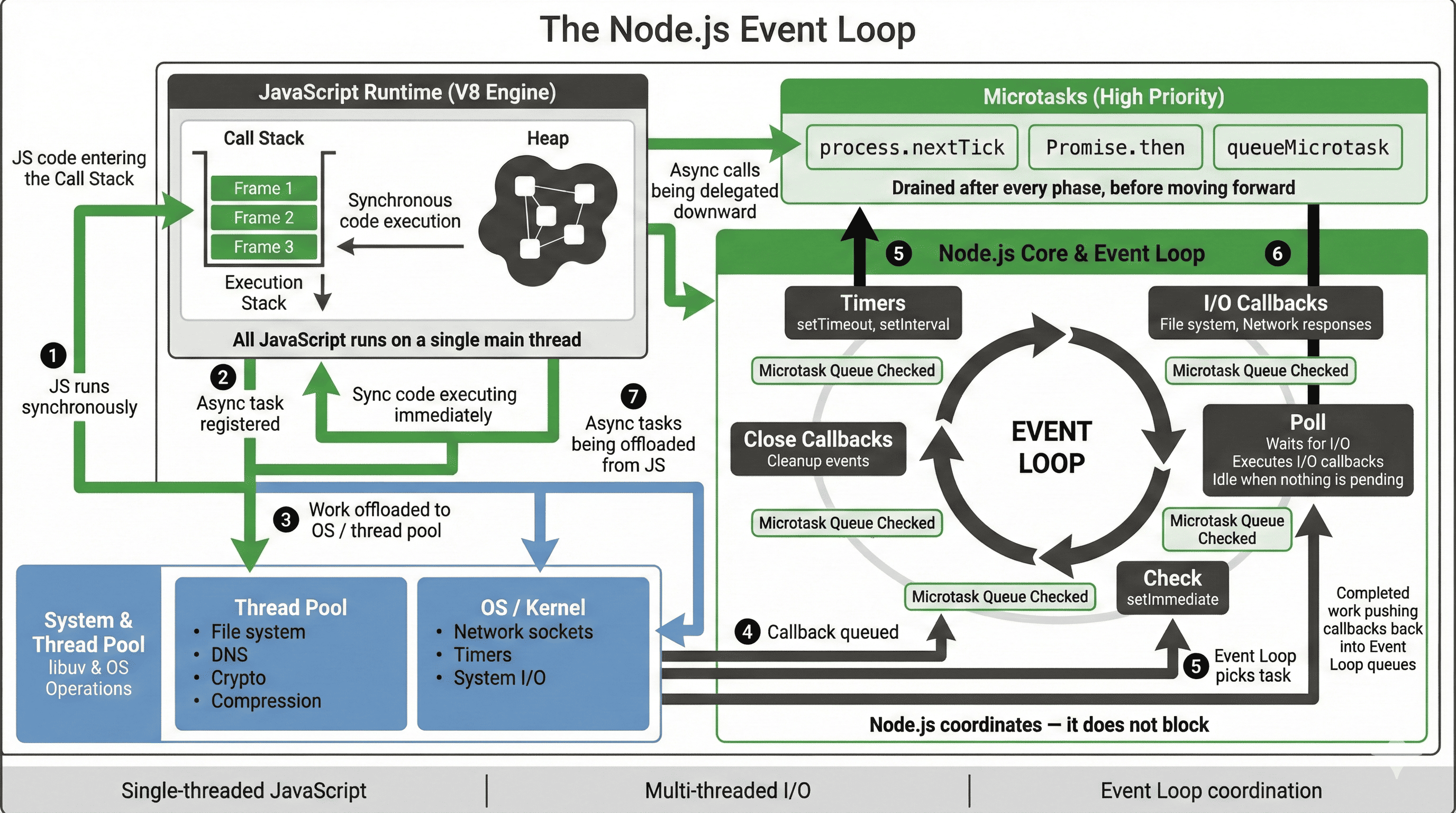
1. The biggest myth about Node.js
You’ve probably heard this sentence:
“Node.js is single-threaded.”
And if you’re like most people, your brain immediately went:
“Wait… single-threaded? How does it handle thousands of users then?”
That confusion exists because the sentence is technically true, but deeply misleading.
Let’s fix that.
2. What “single-threaded” actually means (no fear)
Node.js runs your JavaScript code on one main thread.
That’s it.
One thread executes:
- your functions
- your loops
- your logic
But here’s the part people miss:
Node.js does not do everything on that one thread.
Heavy work like:
- file system access
- network calls
- timers
- DNS
- crypto (sometimes)
is offloaded to the system or to a thread pool.
Node coordinates, it doesn’t grind.
The Event Loop is that coordinator.
3. The core problem the Event Loop solves
Imagine a restaurant.
- One waiter (single thread)
- 50 customers (requests)
If the waiter:
- takes an order
- cooks the food
- serves it
- then moves to the next customer
Everyone starves.
Instead, a smart waiter:
- takes order #1
- sends it to the kitchen
- immediately takes order #2
- checks which food is ready
- serves whoever is done
That waiter is the Event Loop.
4. So… what is the Event Loop?
Here’s the clean definition:
The Event Loop is a loop that continuously checks:
“Is there any JavaScript ready to run right now?”
If yes -> run it If no -> wait efficiently
That’s it.
Node.js is basically doing this forever:
while (app is running) {
  pick the next task
  execute it
}
But which task comes next?
That’s where things get interesting.
5. Synchronous code always runs first
This rule never breaks.
console.log("A");

setTimeout(() => {
  console.log("B");
}, 0);

console.log("C");
Output:
A
C
B
Even with 0 delay, setTimeout is never immediate.
Why?
Because:
- synchronous code runs first
- async callbacks wait their turn
This alone explains 80% of “why is this async behaving weirdly?” bugs.
6. Where async callbacks actually go
When you write async code, Node does not execute it immediately.
Instead:
- the task is registered
- Node moves on
- when the task finishes, its callback is queued
- the Event Loop picks it up later
This queueing system is the key.
7. The Event Loop phases (the real mental model)
The Event Loop runs in phases.
Think of them as checkpoints, not magic.
Here’s the simplified order (the one you actually need):
- Timers
- I/O callbacks
- Polling
- Check
- Close callbacks
Between every phase:
Node checks the microtask queue
Let’s walk through them like a story.
8. Timers phase
This is where:
setTimeoutsetInterval
callbacks run when their delay has passed.
Important:
- Delay means minimum time
- Not guaranteed execution time
If the thread is busy, timers wait.
9. I/O callbacks phase
This is where callbacks from:
- file system
- network
- some system operations
are executed.
Basically:
“Hey Node, that thing you asked the OS to do earlier? It’s done.”
10. Poll phase (the waiting room)
This is the most important phase.
In poll:
- Node waits for new I/O
- executes I/O callbacks
- or sleeps efficiently if nothing is happening
This is why Node doesn’t waste CPU.
11. Check phase (setImmediate)
Callbacks scheduled with:
setImmediate(() => {
  console.log("Immediate");
});
run here.
setImmediate means:
“Run this after I/O, but before timers again.”
It’s not “faster than setTimeout”.
It’s differently scheduled.
12. Microtasks (the VIP lane)
Microtasks are special.
They include:
Promise.thenqueueMicrotaskprocess.nextTick
Rule:
Microtasks run after the current operation,
before the Event Loop moves on.
Example:
setTimeout(() => console.log("timeout"), 0);

Promise.resolve().then(() => console.log("promise"));
Output:
promise
timeout
Why?
Because:
- microtasks drain first
- always
- without exception
13. process.nextTick (dangerously powerful)
process.nextTick runs before everything else.
Even before Promises.
process.nextTick(() => console.log("tick"));
Promise.resolve().then(() => console.log("promise"));
Output:
tick
promise
Warning !!!
Abusing nextTick can starve the Event Loop.
Use it only when you truly understand the consequences.
14. How Buffers, Streams, and Event Loop connect
Now the big picture finally clicks:
- Buffers -> how data is stored
- Streams -> how data flows
- Event Loop -> how tasks are scheduled
When you stream a file:
- chunks (Buffers) are read
- callbacks are queued
- backpressure is managed
- Event Loop decides what runs next
This is Node.js architecture in motion.
15. Why Node.js scales so well
Traditional servers:
- block threads
- wait on I/O
- need many threads
- waste memory
Node.js:
- never blocks the main thread
- offloads I/O
- uses Event Loop to coordinate
- handles massive concurrency efficiently
That’s why Node shines in:
- APIs
- real-time apps
- streaming
- chat systems
- dashboards