Design Patterns in React
Design patterns are reusable solutions to common problems in software design. In this article, we will explore some of the most common design patterns in React.
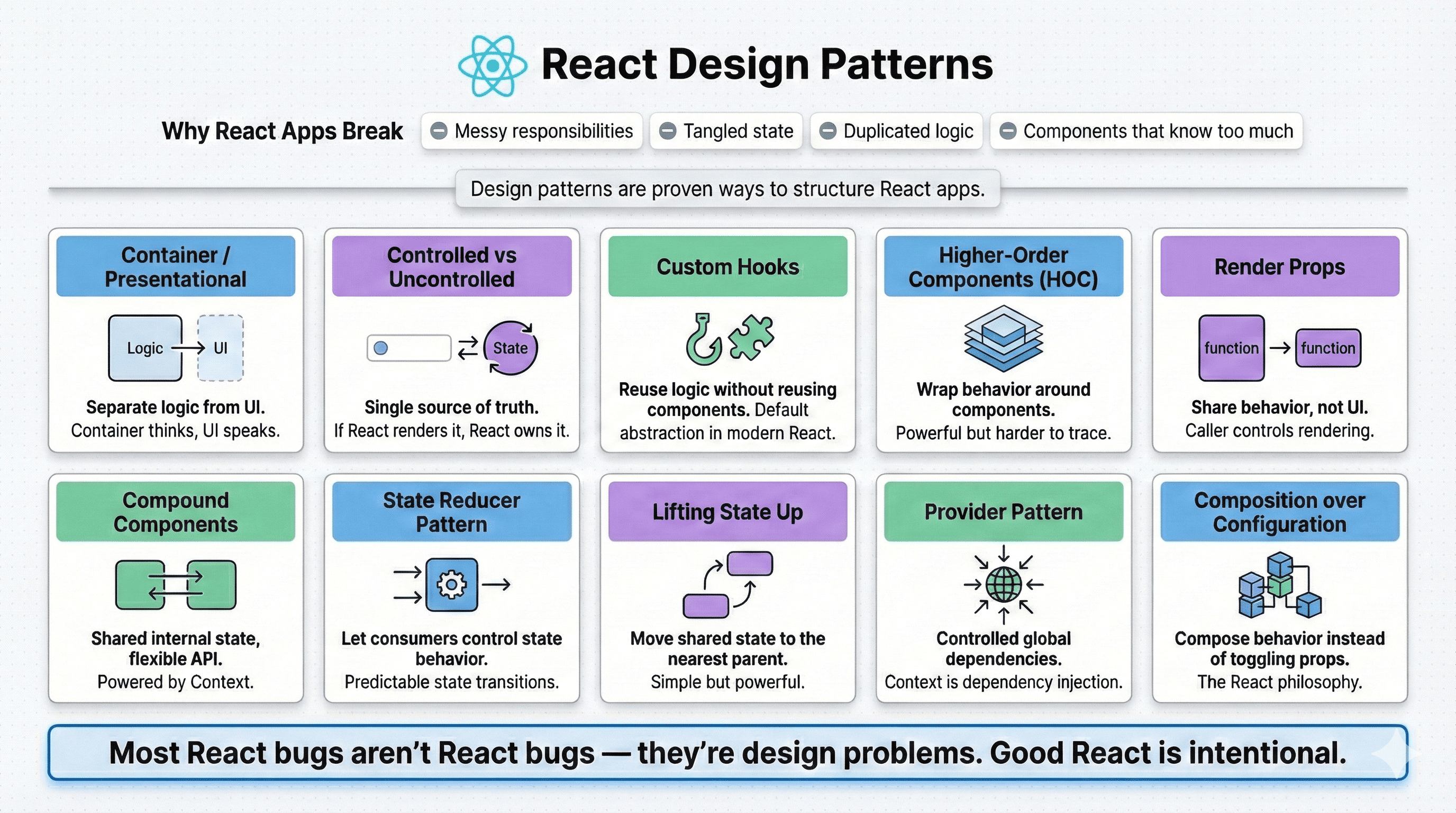
React is simple.
You can learn the basics in a weekend:
- components
- props
- state
- hooks
But real-world React apps don’t fall apart because of syntax.
They fall apart because of:
- messy responsibilities
- tangled state
- duplicated logic
- components that know too much
- unnecessary re-renders
That’s where design patterns come in.
Design patterns are not rules.
They’re proven ways of thinking about structure.
Let’s walk through the most important React design patterns, from foundational to advanced, with real explanations and real code.
1. Container / Presentational Pattern
(a.k.a. separating logic from UI)
The problem
Early React apps often looked like this:
function UserProfile() {
  const [user, setUser] = useState(null);

  useEffect(() => {
    fetch("/api/user")
      .then(res => res.json())
      .then(setUser);
  }, []);

  if (!user) return <Spinner />;

  return (
    <div>
      <h1>{user.name}</h1>
      <p>{user.email}</p>
    </div>
  );
}
This component:
- fetches data
- manages loading state
- renders UI
It works, but it’s doing too much.
The idea
Split responsibilities:
- Container -> handles data & logic
- Presentational -> handles UI only
The pattern
function UserProfileContainer() {
  const [user, setUser] = useState(null);

  useEffect(() => {
    fetch("/api/user")
      .then(res => res.json())
      .then(setUser);
  }, []);

  return <UserProfileView user={user} />;
}

function UserProfileView({ user }) {
  if (!user) return <Spinner />;

  return (
    <div>
      <h1>{user.name}</h1>
      <p>{user.email}</p>
    </div>
  );
}
Why this matters
- UI becomes reusable
- logic becomes testable
- components become readable
Think of it like this:
Containers think.
Presentational components speak.
2. Controlled vs Uncontrolled Components
(single source of truth)
The problem
Forms are where bugs love to live.
<input type="text" />
Where is the value stored?
Inside the DOM. React doesn’t know.
That’s uncontrolled.
Controlled component
function Form() {
  const [name, setName] = useState("");

  return (
    <input
      value={name}
      onChange={e => setName(e.target.value)}
    />
  );
}
Now:
- React owns the value
- UI reflects state
- state drives rendering
When uncontrolled is okay
const inputRef = useRef();

<input ref={inputRef} />
Use this when:
- performance matters
- you don’t need re-renders
- you just need the value once
Rule of thumb
If React renders it, React should own it.
3. Custom Hooks
(logic reuse without component reuse)
The problem
You copy-paste logic between components.
useEffect(() => {
  fetch(url)
    .then(res => res.json())
    .then(setData);
}, []);
That’s a smell.
The idea
Extract logic into a hook.
The pattern
function useFetch(url) {
  const [data, setData] = useState(null);

  useEffect(() => {
    fetch(url)
      .then(res => res.json())
      .then(setData);
  }, [url]);

  return data;
}
Usage:
const user = useFetch("/api/user");
Why this is powerful
- hooks compose beautifully
- no wrapper components
- logic stays close to React
Custom hooks are the default abstraction mechanism in modern React.
4. Lifting State Up
(shared ownership)
Sometimes patterns are simple.
The problem
Two components need the same state.
Bad solution:
- duplicate state
- sync manually
Simple solution:
- move it up.
function Parent() {
  const [value, setValue] = useState("");

  return (
    <>
      <Input value={value} onChange={setValue} />
      <Preview value={value} />
    </>
  );
}
Why this works?
- single source of truth
- predictable renders
- no hidden coupling
If multiple components need the same data, the state does not belong to either of them.
Simple. Powerful. Often overlooked.
5. Render Props
(sharing behavior, not UI)
The idea
Instead of passing JSX as children, you pass a function.
Example
function MouseTracker({ render }) {
  const [pos, setPos] = useState({ x: 0, y: 0 });

  return (
    <div onMouseMove={e => setPos({ x: e.clientX, y: e.clientY })}>
      {render(pos)}
    </div>
  );
}
Usage:
<MouseTracker render={({ x, y }) => (
  <p>{x}, {y}</p>
)} />
Why it exists
- maximum flexibility
- caller controls rendering
- logic stays reusable
Today?
Hooks replaced most render-prop use cases, but the mental model is still valuable.
6. State Reducer Pattern
(giving control to consumers)
This pattern is about sharing control without losing structure.
The problem
Your component manages state... but consumers want custom behavior.
const [on, setOn] = useState(false);
The idea
Expose a reducer hook.
Example
function toggleReducer(
  state: { on: boolean },
  action: { type: "toggle" | "reset" }
) {
  switch (action.type) {
    case "toggle":
      return { on: !state.on };
    case "reset":
      return { on: false };
    default:
      return state;
  }
}
Usage:
function Toggle({ reducer = toggleReducer }) {
  const [state, dispatch] = useReducer(reducer, { on: false });

  return (
    <button onClick={() => dispatch({ type: "toggle" })}>
      {state.on ? "ON" : "OFF"}
    </button>
  );
}
<Toggle
  reducer={(state, action) => {
    if (action.type === "toggle" && state.on) {
      return state; // block turning off
    }
    return toggleReducer(state, action);
  }}
/>
Why this matters
- advanced customization
- predictable state transitions
- used in serious component libraries
This pattern is advanced React.
7. Compound Components
(shared state, flexible API)
This one is extremely important and one of my favorite patterns.
The problem
You want this API:
<Select>
  <Select.Trigger />
  <Select.Options>
    <Select.Option value="A" />
    <Select.Option value="B" />
  </Select.Options>
</Select>
Key requirements:
- All subcomponents share state
- Parent controls behavior
- Consumer controls layout and composition
- No prop drilling
Passing props manually would be ugly and brittle.
The idea
Use React Context internally.
The pattern
const SelectContext = React.createContext();

function Select({ children }) {
  const [value, setValue] = useState(null);

  return (
    <SelectContext.Provider value={{ value, setValue }}>
      {children}
    </SelectContext.Provider>
  );
}

function Option({ value }) {
  const { setValue } = useContext(SelectContext);

  return (
    <button onClick={() => setValue(value)}>
      {value}
    </button>
  );
}
Why this is powerful
- clean public API
- internal flexibility
This pattern is used heavily in:
- Radix UI
- Shadcn UI
- Headless UI
- Chakra
- MUI
8. Provider Pattern
(global but controlled state)
Often confused with “global state management”.
It is not.
Used with:
- Context
- Theme
- Auth
- Feature flags
<AuthProvider>
  <ThemeProvider>
    <App />
  </ThemeProvider>
</AuthProvider>
Each provider:
- owns its domain
- exposes a stable API
- hides implementation details
9. Composition over Configuration
(the React philosophy)
This is not just a pattern -
this is how React wants you to think.
Instead of Configuration-heavy API (rigid):
<Button
  icon="save"
  iconPosition="left"
  size="lg"
  variant="primary"
/>
React prefers Composition-based API (flexible):
<Button>
  <SaveIcon />
  Save
</Button>
Why composition scales
- fewer props
- infinite flexibility
- better readability
- easier extension
This is why React component libraries age well.
10. Higher-Order Components (HOC)
(wrapping behavior)
The idea
A Higher-Order Component is:
a function that takes a component and returns a new component
Example: authentication
function withAuth(Component) {
  return function Authenticated(props) {
    if (!props.user) {
      return <Login />;
    }

    return <Component {...props} />;
  };
}
Usage:
const DashboardWithAuth = withAuth(Dashboard);
Why HOCs fell out of favor
- wrapper hell
- harder to trace props
- hooks replaced most use cases
When HOCs still shine
- cross-cutting concerns
- library-level abstractions
- legacy codebases
Final takeaway
Most React bugs aren’t React bugs.
They’re design problems.
If you understand these patterns:
- your components stay small
- your state stays predictable
- your code ages well
React isn’t hard.
But good React is intentional.